 D&D Tracker
D&D 2024 · From prep to combat
How to prepare D&D encounters
In DM campaign mode, prepare an encounter with XP budget, then run initiative, HP, and the end summary.
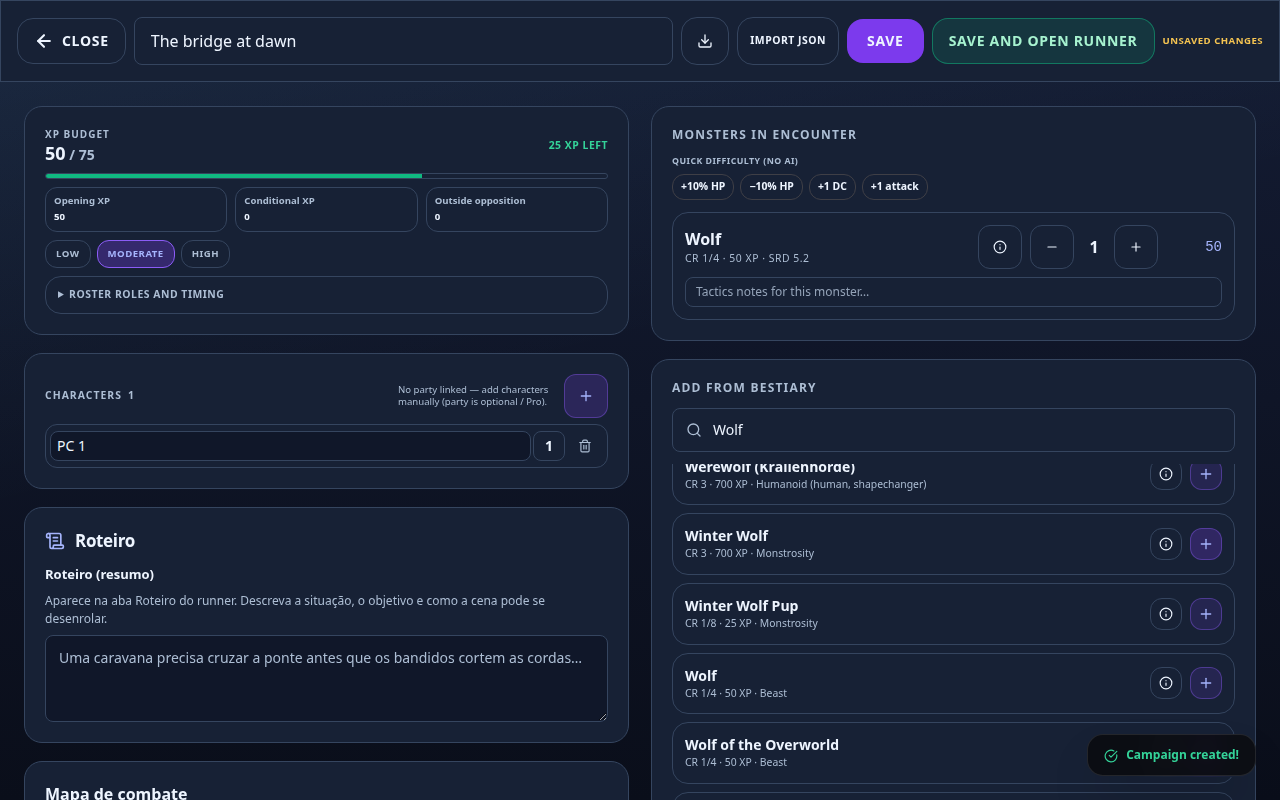
Encounters live in DM campaign mode. You prepare a fight in the builder (roster, monsters, difficulty, XP budget, notes), then run it live with initiative, turn order, HP, and an end-of-combat summary.
Where
- Open a campaign as DM and select the Encounters tab.
- New encounter starts the builder. Saved cards open details; from there you Start the runner.
Build an encounter
- Select New encounter.
- Enter an Encounter name and choose Low, Moderate, or High difficulty.
- Under Characters, import from the linked party or add each character and level manually.
- Search Add from bestiary and add monsters; adjust quantities and open a stat block when needed.
- Compare spent XP with XP budget and read warnings about creature count, high CR, or too many different stat blocks.
- Add Notes for terrain, tactics, or reinforcements, then save and confirm the card appears in the list.
Run an encounter
- Open a prepared encounter card and review the participants.
- Select Start to open the live runner.
- Set or review initiative so the turn order matches the table.
- Advance turns as each participant finishes acting.
- Use participant controls to apply damage or healing when HP changes.
- Select End only when the fight is actually over, then review the summary before moving on.
Tips / Pitfalls
- The builder and runner need campaign mode (DM). They are not available on a standalone character sheet.
- A linked party is optional for the budget; manual characters still work.
- XP budget is guidance, not a guarantee — high CR and action economy can outpace the total.
- Do not use End just to leave the screen; it closes the encounter and creates the summary.
- Fix missing monsters or roster mistakes before Start when you can.